component
Explore creation
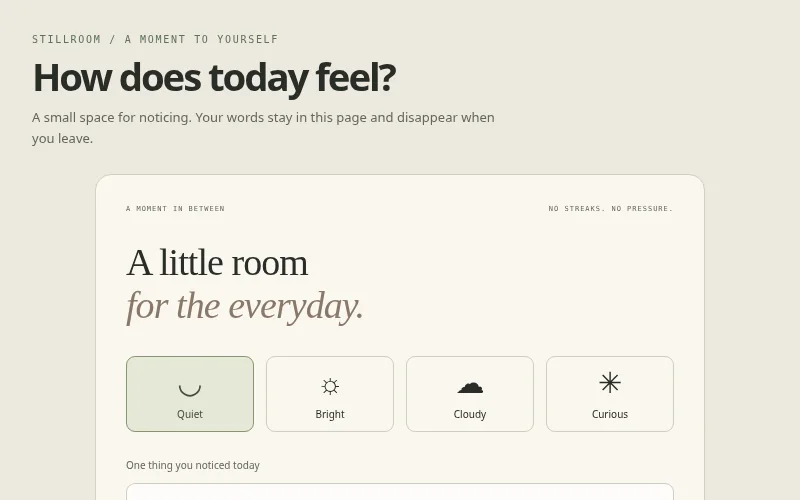
A personal journaling card with mood selection, a short editable reflection and a local session-only rea…
A nerdy desktop command launcher with a searchable native dialog, keyboard shortcuts and local demo actions.
<!-- Original layout, SVG/CSS artwork and JavaScript © 2026 XXC Templates. MIT License.
Illustrative sample content and data; no real accounts, purchases or bookings. -->
<main>
  <header class="intro">
    <div>
      <div class="kicker">KEYSTACK / KEYBOARD FIRST</div>
      <h1>Stay in the flow.</h1>
      <p>
        Press Ctrl/⌘ K, or open the launcher. Filter commands and use Tab + Enter to activate one.
      </p>
    </div>
  </header>
  <section class="desk panel">
    <div class="desk-top"><span>workspace / experiments</span><span>● ONLINE LOCALLY</span></div>
    <div class="desk-body">
      <div class="ascii" aria-hidden="true">[ + ]</div>
      <h2>A small shortcut.<br />A little more momentum.</h2>
      <p>Find a command without leaving your train of thought.</p>
      <button id="change" class="primary">Open command palette <kbd>⌘ K</kbd></button>
    </div>
  </section>
  <output id="status" class="status" aria-live="polite"></output>
  <dialog id="palette">
    <label class="sr-only" for="search">Find a command</label
    ><input id="search" placeholder="Type a command…" autocomplete="off" />
    <div id="commands"></div>
    <p id="empty" hidden>No matching commands. Try “theme” or “note”.</p>
    <div class="palette-footer">
      <span>TAB TO NAVIGATE / ENTER TO RUN</span><button id="close">Esc / Close</button>
    </div>
  </dialog>
</main>
:root {
  --bg: #081914;
  --panel: #10271e;
  --text: #d9ffe1;
  --muted: #90b69e;
  --line: #29543d;
  --accent: #a2ed79;
}
/* Original XXC Templates Studio collection. MIT; sample data only. */
* {
  box-sizing: border-box;
}
html {
  color-scheme: dark;
}
body {
  margin: 0;
  background: var(--bg);
  color: var(--text);
  font:
    14px/1.6 system-ui,
    -apple-system,
    BlinkMacSystemFont,
    "Segoe UI",
    sans-serif;
  padding: clamp(18px, 4vw, 40px);
  min-height: 100vh;
}
h1,
h2,
h3,
p {
  margin: 0;
}
h1 {
  font-size: clamp(27px, 4.8vw, 46px);
  line-height: 1.07;
  letter-spacing: -0.055em;
  font-weight: 650;
}
h2 {
  font-size: 22px;
  letter-spacing: -0.025em;
  line-height: 1.2;
}
h3 {
  font-size: 15px;
}
p {
  color: var(--muted);
}
button,
input,
select {
  font: inherit;
}
button,
a,
input,
select,
summary {
  touch-action: manipulation;
}
button {
  cursor: pointer;
  color: var(--text);
  background: var(--panel);
  border: 1px solid var(--line);
  border-radius: 9px;
  padding: 9px 14px;
  font-size: 12px;
}
button:hover {
  border-color: var(--accent);
}
button[aria-pressed="true"],
button.active {
  background: var(--accent);
  color: var(--bg);
  border-color: var(--accent);
}
button:disabled {
  opacity: 0.5;
  cursor: default;
}
button:focus-visible,
a:focus-visible,
input:focus-visible,
select:focus-visible,
summary:focus-visible,
[tabindex]:focus-visible {
  outline: 3px solid var(--accent);
  outline-offset: 4px;
}
a {
  color: inherit;
  text-underline-offset: 4px;
}
input,
select {
  min-width: 0;
  max-width: 100%;
  color: var(--text);
  background: var(--bg);
  border: 1px solid var(--line);
  border-radius: 8px;
  padding: 9px;
}
input[type="range"] {
  accent-color: var(--accent);
  padding: 0;
}
input[type="checkbox"] {
  accent-color: var(--accent);
}
label {
  display: flex;
  gap: 8px;
  align-items: center;
  font-size: 12px;
  color: var(--muted);
}
svg {
  max-width: 100%;
  display: block;
}
img {
  display: block;
  width: 100%;
  height: 100%;
  object-fit: cover;
}
main {
  max-width: 1120px;
  margin: auto;
  min-width: 0;
}
.kicker {
  text-transform: uppercase;
  letter-spacing: 0.17em;
  font:
    10px/1.6 ui-monospace,
    monospace;
  color: var(--accent);
}
.intro {
  display: flex;
  justify-content: space-between;
  gap: 20px;
  align-items: center;
  margin-bottom: 25px;
}
.intro h1 {
  margin: 8px 0 10px;
}
.intro p {
  max-width: 470px;
  font-size: 13px;
}
.badge {
  display: inline-flex;
  border: 1px solid var(--line);
  border-radius: 50px;
  padding: 5px 10px;
  font:
    10px ui-monospace,
    monospace;
  color: var(--muted);
}
.panel {
  background: var(--panel);
  border: 1px solid var(--line);
  border-radius: 16px;
  padding: 22px;
  min-width: 0;
}
.toolbar {
  display: flex;
  gap: 9px;
  flex-wrap: wrap;
  align-items: center;
  margin: 16px 0;
}
.primary {
  background: var(--accent);
  color: var(--bg);
  border-color: var(--accent);
}
.grid {
  display: grid;
  grid-template-columns: repeat(3, minmax(0, 1fr));
  gap: 15px;
}
.muted {
  color: var(--muted);
}
.metric {
  font-size: 36px;
  letter-spacing: -0.05em;
  font-weight: 600;
}
.mono {
  font-family: ui-monospace, monospace;
}
.rule {
  border: 0;
  border-top: 1px solid var(--line);
  margin: 20px 0;
}
footer,
.footnote {
  font-size: 10px;
  color: var(--muted);
  margin-top: 18px;
}
.status {
  display: block;
  min-height: 20px;
  margin-top: 10px;
  color: var(--accent);
  font-size: 12px;
}
.sr-only {
  position: absolute;
  width: 1px;
  height: 1px;
  overflow: hidden;
  clip: rect(0, 0, 0, 0);
}
[hidden] {
  display: none !important;
}
.data-table {
  margin-top: 16px;
  font-size: 11px;
  color: var(--muted);
}
.data-table summary {
  cursor: pointer;
}
.table-scroll {
  overflow: auto;
  max-width: 100%;
}
table {
  border-collapse: collapse;
  width: 100%;
  font-size: 11px;
}
th,
td {
  text-align: left;
  border-bottom: 1px solid var(--line);
  padding: 9px;
  white-space: nowrap;
}
caption {
  text-align: left;
  color: var(--muted);
  padding: 8px 0;
}
.legend {
  display: flex;
  gap: 17px;
  flex-wrap: wrap;
  font-size: 11px;
  color: var(--muted);
}
.legend i {
  display: inline-block;
  width: 8px;
  height: 8px;
  border-radius: 50%;
  background: var(--c);
  margin-right: 6px;
}
dialog {
  max-width: calc(100vw - 36px);
  width: 460px;
  background: var(--panel);
  color: var(--text);
  border: 1px solid var(--line);
  border-radius: 16px;
  padding: 25px;
}
dialog::backdrop {
  background: #000a;
}
dialog p {
  margin: 12px 0;
}
.media-credit {
  font-size: 9px;
  margin-top: 16px;
  color: var(--muted);
}
.stage {
  position: relative;
  min-height: 290px;
  border-radius: 18px;
  overflow: hidden;
  border: 1px solid var(--line);
  background: var(--panel);
}
@media (max-width: 520px) {
  .intro {
    align-items: flex-start;
    flex-direction: column;
  }
  .grid {
    grid-template-columns: 1fr;
  }
  .panel {
    padding: 17px;
  }
  .toolbar label {
    flex-wrap: wrap;
  }
  .stage {
    min-height: 270px;
  }
  h1 {
    font-size: 32px;
  }
  .intro p {
    font-size: 12px;
  }
}
@media (prefers-reduced-motion: reduce) {
  *,
  *:before,
  *:after {
    animation: none !important;
    transition: none !important;
    scroll-behavior: auto !important;
  }
}
html {
  color-scheme: dark;
}
.desk {
  padding: 0;
  overflow: hidden;
}
.desk-top {
  display: flex;
  justify-content: space-between;
  gap: 15px;
  padding: 13px 20px;
  border-bottom: 1px solid var(--line);
  font:
    8px ui-monospace,
    monospace;
  color: var(--muted);
}
.desk-body {
  text-align: center;
  padding: 35px 20px;
}
.ascii {
  font:
    40px ui-monospace,
    monospace;
  color: var(--accent);
  margin-bottom: 22px;
}
.desk h2 {
  font-size: 28px;
}
.desk p {
  font-size: 11px;
  margin: 15px 0 23px;
}
.desk kbd {
  margin-left: 15px;
  background: #0002;
  padding: 2px 5px;
  border-radius: 4px;
}
#palette {
  padding: 16px;
}
#search {
  width: 100%;
  padding: 14px;
  font-size: 14px;
}
#commands {
  display: grid;
  gap: 5px;
  margin: 12px 0;
}
#commands button {
  display: flex;
  justify-content: space-between;
  text-align: left;
  border-color: transparent;
  padding: 12px;
}
#commands button:hover {
  background: var(--bg);
  border-color: var(--line);
}
#commands span {
  color: var(--muted);
  font:
    9px ui-monospace,
    monospace;
}
.palette-footer {
  display: flex;
  justify-content: space-between;
  align-items: center;
  border-top: 1px solid var(--line);
  padding-top: 10px;
  gap: 10px;
}
.palette-footer > span {
  font:
    7px ui-monospace,
    monospace;
  color: var(--muted);
}
.palette-footer button {
  font-size: 9px;
}
#empty {
  font-size: 12px;
}
.desk.light {
  --panel: #dcebdd;
  --text: #173621;
  --muted: #496a51;
  --line: #b0c6b0;
  --accent: #3c672a;
}
(() => {
  "use strict";
  const $ = (s) => document.querySelector(s),
    $$ = (s) => [...document.querySelectorAll(s)],
    status = (t) => {
      const el = $("#status");
      if (el) el.textContent = t;
    },
    clamp = (n, a, b) => Math.max(a, Math.min(b, n));
  const reduced = matchMedia("(prefers-reduced-motion: reduce)").matches;
  const ns = "http://www.w3.org/2000/svg";
  function svg(tag, attrs = {}, text) {
    const el = document.createElementNS(ns, tag);
    for (const [k, v] of Object.entries(attrs)) el.setAttribute(k, String(v));
    if (text !== undefined) el.textContent = text;
    return el;
  }
  function table(headers, rows) {
    const t = $("#data-table");
    if (!t) return;
    t.replaceChildren();
    const caption = document.createElement("caption");
    caption.textContent = "Illustrative sample data";
    t.append(caption);
    const head = t.createTHead().insertRow();
    headers.forEach((v) => {
      const th = document.createElement("th");
      th.scope = "col";
      th.textContent = v;
      head.append(th);
    });
    const body = t.createTBody();
    rows.forEach((row) => {
      const r = body.insertRow();
      row.forEach((v) => (r.insertCell().textContent = String(v)));
    });
  }
  function selectButtons(selector, callback) {
    $$(selector).forEach((b) =>
      b.addEventListener("click", () => {
        $$(selector).forEach((x) => x.setAttribute("aria-pressed", String(x === b)));
        callback(b);
      }),
    );
  }

  const actions = [
    [
      "New note",
      "CREATE",
      () => status("A new local demo note is ready. Start with one good idea."),
    ],
    [
      "Toggle workspace theme",
      "APPEARANCE",
      () => {
        $(".desk").classList.toggle("light");
        status("Workspace theme toggled.");
      },
    ],
    [
      "Focus mode",
      "VIEW",
      () => {
        $(".desk-top").hidden = !$(".desk-top").hidden;
        status("Focus mode toggled.");
      },
    ],
    [
      "Show keyboard help",
      "HELP",
      () => status("Ctrl/⌘ K opens the palette. Tab moves between commands. Escape closes it."),
    ],
  ];
  function render() {
    const list = actions.filter((a) =>
      a[0].toLowerCase().includes($("#search").value.toLowerCase()),
    );
    $("#commands").replaceChildren();
    list.forEach(([title, type, run]) => {
      const b = document.createElement("button");
      b.textContent = title;
      const tag = document.createElement("span");
      tag.textContent = type;
      b.append(tag);
      b.addEventListener("click", () => {
        $("#palette").close();
        run();
      });
      $("#commands").append(b);
    });
    $("#empty").hidden = list.length > 0;
  }
  function open() {
    if ($("#palette").open) return;
    $("#search").value = "";
    render();
    $("#palette").showModal();
    $("#search").focus();
    status("Command palette opened.");
  }
  $("#change").addEventListener("click", open);
  $("#close").addEventListener("click", () => $("#palette").close());
  $("#search").addEventListener("input", render);
  document.addEventListener("keydown", (e) => {
    if ((e.metaKey || e.ctrlKey) && e.key.toLowerCase() === "k") {
      e.preventDefault();
      open();
    }
  });
})();
A personal journaling card with mood selection, a short editable reflection and a local session-only rea…
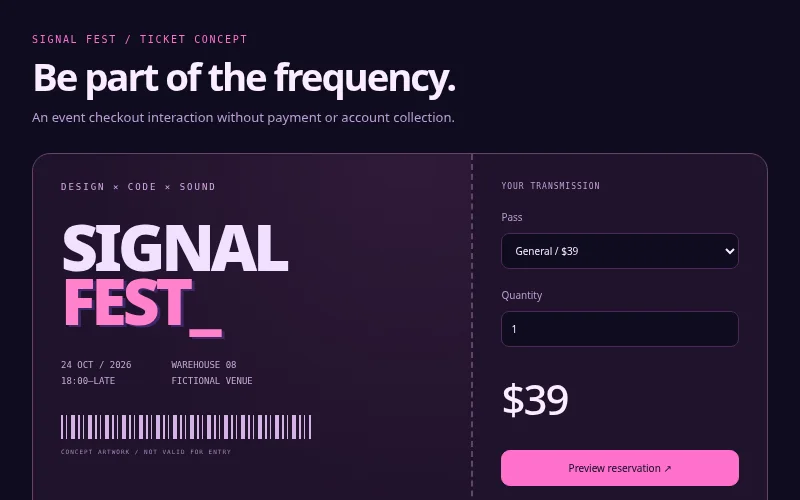
A cyberpunk event ticket with quantity calculation, tier selection and a clearly marked local reservatio…
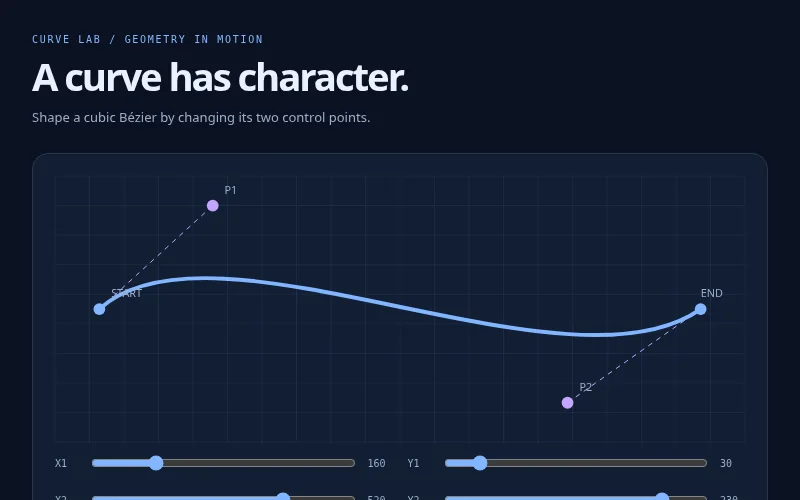
An interactive cubic Bézier diagram with keyboard-friendly control sliders and copyable path coordinates.