template
Explore creation
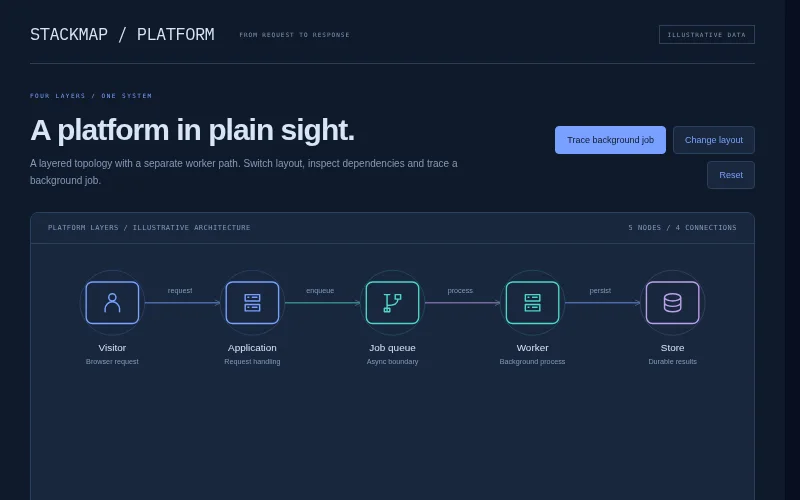
A slate-blue platform map that connects visitors, an edge layer, services and storage with readable labe…
A practical three-stage Kanban board with paper-like task cards and keyboard-friendly buttons to advance tasks.
<!-- Original layout, SVG/CSS artwork and JavaScript © 2026 XXC Templates. MIT License.
Visual pattern references (original code, names and content; no affiliation):
Trello: https://trello.com/
Stage-based lists, compact task cards and practical board navigation.
Illustrative sample content and data; no real accounts, payments, reservations or messages. -->
<main>
  <header>
    <b>lane by lane.</b><span>SMALL STEPS. VISIBLE PROGRESS.</span
    ><button id="change">Move first task →</button>
  </header>
  <section class="board-title">
    <div>
      <small>PERSONAL WORKSPACE / WEEK 41</small>
      <h1>The little website project</h1>
      <p>Keep the important things moving.</p>
    </div>
    <div class="avatars"><i>M</i><i>F</i><i>J</i></div>
  </section>
  <section class="lanes">
    <div class="lane" data-lane="todo">
      <h2><i style="background: #ad8965"></i>To explore<span>3</span></h2>
      <div class="cards">
        <article>
          <small>RESEARCH</small>
          <h3>Collect visual references</h3>
          <div>
            <span>◎ LOCAL TASK</span
            ><button data-move aria-label="Move Collect visual references to the next stage">
              →
            </button>
          </div>
        </article>
        <article>
          <small>DESIGN</small>
          <h3>Sketch the reading page</h3>
          <div>
            <span>◎ LOCAL TASK</span
            ><button data-move aria-label="Move Sketch the reading page to the next stage">
              →
            </button>
          </div>
        </article>
        <article>
          <small>DESIGN</small>
          <h3>Try a new type pairing</h3>
          <div>
            <span>◎ LOCAL TASK</span
            ><button data-move aria-label="Move Try a new type pairing to the next stage">→</button>
          </div>
        </article>
      </div>
    </div>
    <div class="lane" data-lane="doing">
      <h2><i style="background: #638a88"></i>In the making<span>2</span></h2>
      <div class="cards">
        <article>
          <small>BUILD</small>
          <h3>Build the tiny prototype</h3>
          <div>
            <span>◎ LOCAL TASK</span
            ><button data-move aria-label="Move Build the tiny prototype to the next stage">
              →
            </button>
          </div>
        </article>
        <article>
          <small>CONTENT</small>
          <h3>Write the first five notes</h3>
          <div>
            <span>◎ LOCAL TASK</span
            ><button data-move aria-label="Move Write the first five notes to the next stage">
              →
            </button>
          </div>
        </article>
      </div>
    </div>
    <div class="lane" data-lane="done">
      <h2><i style="background: #849c6a"></i>Good enough<span>1</span></h2>
      <div class="cards">
        <article>
          <small>DECISION</small>
          <h3>Name the project</h3>
          <div>
            <span>◎ LOCAL TASK</span
            ><button data-move aria-label="Move Name the project to the next stage">→</button>
          </div>
        </article>
      </div>
    </div>
  </section>
  <output data-status aria-live="polite"></output>
  <footer class="demo-note">Fictional brand · local interface demo · no information is sent</footer>
</main>
* {
  box-sizing: border-box;
}
html {
  scrollbar-gutter: stable;
}
body {
  margin: 0;
  font:
    14px/1.5 Arial,
    Helvetica,
    sans-serif;
  background: #fff;
  color: #202622;
}
h1,
h2,
h3,
p,
figure {
  margin: 0;
}
main,
section,
article,
aside,
header,
nav {
  min-width: 0;
}
button,
input,
select,
textarea {
  font: inherit;
  max-width: 100%;
  min-width: 0;
}
button,
a,
input,
select,
summary {
  touch-action: manipulation;
}
button {
  cursor: pointer;
}
a {
  color: inherit;
}
img {
  display: block;
  max-width: 100%;
  object-fit: cover;
}
svg {
  display: block;
  max-width: 100%;
}
button:focus-visible,
a:focus-visible,
input:focus-visible,
select:focus-visible,
textarea:focus-visible,
summary:focus-visible,
[tabindex]:focus-visible {
  outline: 3px solid #2781da;
  outline-offset: 3px;
}
[hidden] {
  display: none !important;
}
[data-status] {
  display: block;
  min-height: 24px;
  font-size: 12px;
  margin-top: 14px;
}
.demo-note {
  font:
    9px/1.6 ui-monospace,
    monospace;
  padding: 16px 0;
  opacity: 0.75;
}
.sr-only {
  position: absolute;
  width: 1px;
  height: 1px;
  overflow: hidden;
  clip-path: inset(50%);
}
dialog {
  max-width: calc(100vw - 32px);
  width: 480px;
  border: 1px solid #666;
  padding: 25px;
  background: #fff;
  color: #202622;
}
dialog::backdrop {
  background: #0008;
}
dialog h2 {
  margin-bottom: 15px;
}
dialog p {
  margin: 12px 0;
}
dialog button {
  margin-top: 16px;
}
@media (prefers-reduced-motion: reduce) {
  *,
  *:before,
  *:after {
    animation: none !important;
    transition: none !important;
    scroll-behavior: auto !important;
  }
}
body {
  background: #e7ece7;
  color: #3c5148;
}
main {
  max-width: 1100px;
  margin: auto;
  padding: 25px 30px;
}
header {
  display: flex;
  align-items: center;
  gap: 25px;
  border-bottom: 1px solid #b9c8bc;
  padding-bottom: 20px;
}
header > b {
  font:
    25px Georgia,
    serif;
  letter-spacing: -1px;
}
header > span {
  font: 6px monospace;
  letter-spacing: 1px;
  color: #96a38f;
}
header button {
  margin-left: auto;
  background: #365f4c;
  color: #f1f5eb;
  border: 0;
  padding: 10px 13px;
  font-size: 9px;
}
.board-title {
  display: flex;
  align-items: center;
  justify-content: space-between;
  gap: 20px;
  margin: 27px 0;
}
.board-title small {
  font: 6px monospace;
  letter-spacing: 1px;
  color: #8d9b86;
}
h1 {
  font-size: 28px;
  letter-spacing: -1px;
  margin: 12px 0 7px;
}
.board-title p {
  font-size: 10px;
  color: #8a9b86;
}
.avatars {
  display: flex;
  padding-right: 5px;
}
.avatars i {
  font:
    10px Georgia,
    serif;
  display: grid;
  place-items: center;
  width: 30px;
  height: 30px;
  border: 2px solid #e7ece7;
  border-radius: 50%;
  background: #c1cdb3;
  color: #67755b;
  margin-right: -5px;
}
.avatars i:nth-child(2) {
  background: #d9c6b3;
}
.avatars i:nth-child(3) {
  background: #c8c3d9;
}
.lanes {
  display: grid;
  grid-template-columns: repeat(3, 1fr);
  gap: 18px;
}
.lane {
  background: #d8e2d6;
  padding: 15px;
  min-height: 300px;
}
.lane h2 {
  display: flex;
  align-items: center;
  gap: 8px;
  font-size: 11px;
  font-weight: normal;
  margin-bottom: 15px;
}
.lane h2 i {
  width: 6px;
  height: 6px;
  border-radius: 50%;
}
.lane h2 > span {
  margin-left: auto;
  color: #91a28b;
  font-size: 9px;
}
article {
  background: #fafbf5;
  padding: 14px;
  margin-bottom: 10px;
  border: 1px solid #cdd9c5;
  box-shadow: 0 2px 0 #b4c6ae33;
}
article > small {
  font: 6px monospace;
  color: #9c997d;
  letter-spacing: 0.5px;
}
h3 {
  font-size: 12px;
  font-weight: normal;
  line-height: 1.6;
  margin: 8px 0 15px;
}
article > div {
  display: flex;
  align-items: center;
  justify-content: space-between;
}
article span {
  font: 6px monospace;
  color: #a0ad94;
}
article button {
  background: none;
  border: 0;
  color: #789a67;
  padding: 0 5px;
  font-size: 18px;
}
@media (max-width: 550px) {
  main {
    padding: 20px;
  }
  header > span {
    display: none;
  }
  header > b {
    font-size: 22px;
  }
  header button {
    font-size: 8px;
  }
  .board-title .avatars {
    display: none;
  }
  h1 {
    font-size: 25px;
  }
  .lanes {
    grid-template-columns: 1fr;
  }
  .lane {
    min-height: 0;
  }
  .lane h2 {
    font-size: 13px;
  }
}
(() => {
"use strict";
const $ = (s) => document.querySelector(s),
$$ = (s) => [...document.querySelectorAll(s)];
const status = (text) => {
const el = $("[data-status]");
if (el) el.textContent = text;
};
const escapeText = (s) =>
String(s).replaceAll("&", "&").replaceAll("<", "<").replaceAll(">", ">");
function choose(selector, fn) {
$$(selector).forEach((b) =>
b.addEventListener("click", () => {
$$(selector).forEach((x) => x.setAttribute("aria-pressed", String(x === b)));
fn(b);
}),
);
}
function filter(selector, items, key) {
choose(selector, (b) => {
$$(items).forEach(
(el) => (el.hidden = b.dataset[key] !== "all" && el.dataset.kind !== b.dataset[key]),
);
status($$(items).filter((el) => !el.hidden).length + " results shown.");
});
}
function textList(target, values) {
$(target).replaceChildren(
...values.map((text) => {
const p = document.createElement("p");
p.textContent = text;
return p;
}),
);
}
const order = ["todo", "doing", "done"];
function advance(card) {
const lane = card.closest("[data-lane]").dataset.lane;
const next = order[(order.indexOf(lane) + 1) % 3];
$('[data-lane="' + next + '"] .cards').append(card);
$$(".lane").forEach(
(el) => (el.querySelector("h2>span").textContent = el.querySelectorAll("article").length),
);
status(
card.querySelector("h3").textContent +
" moved to " +
$('[data-lane="' + next + '"] h2')
.textContent.replace(/\d+$/, "")
.trim() +
".",
);
}
$$("[data-move]").forEach((b) =>
b.addEventListener("click", () => advance(b.closest("article"))),
);
$("#change").addEventListener("click", () => advance($(".lanes article")));
})();
A slate-blue platform map that connects visitors, an edge layer, services and storage with readable labe…
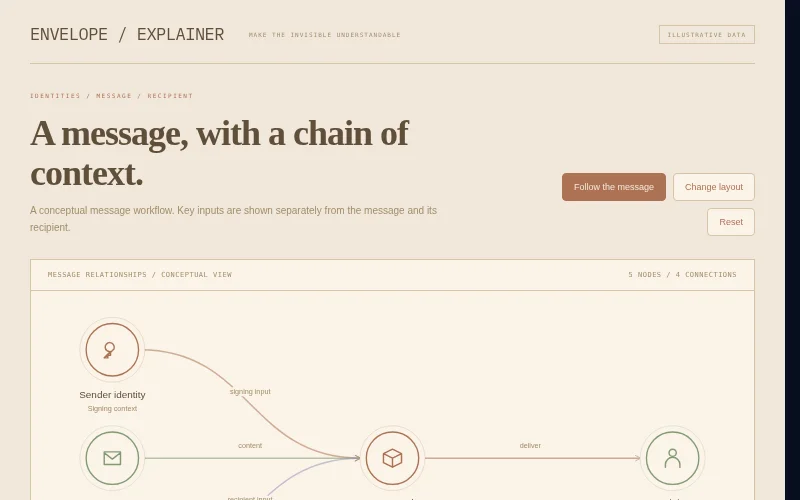
A warm paper diagram explaining sender, recipient and message relationships with key and envelope glyphs…
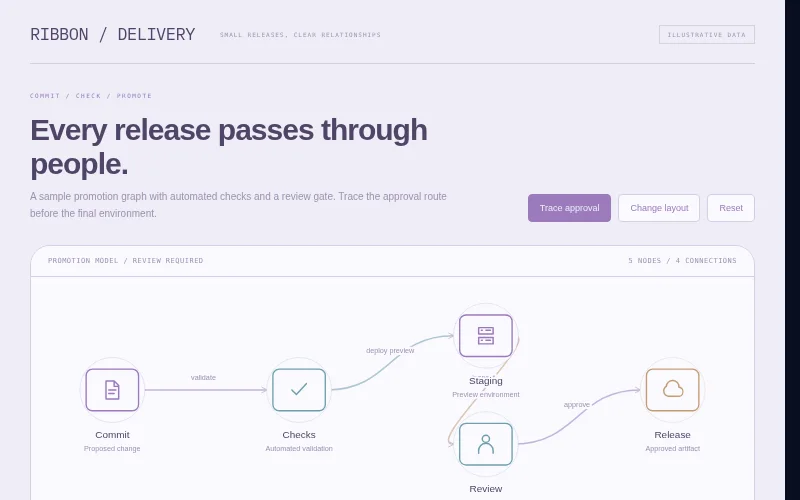
A pale violet delivery pipeline with branch and merge relationships, distinct gates and a selectable pro…